How do I use a discount code?
Last updated: Jun 02, 2026
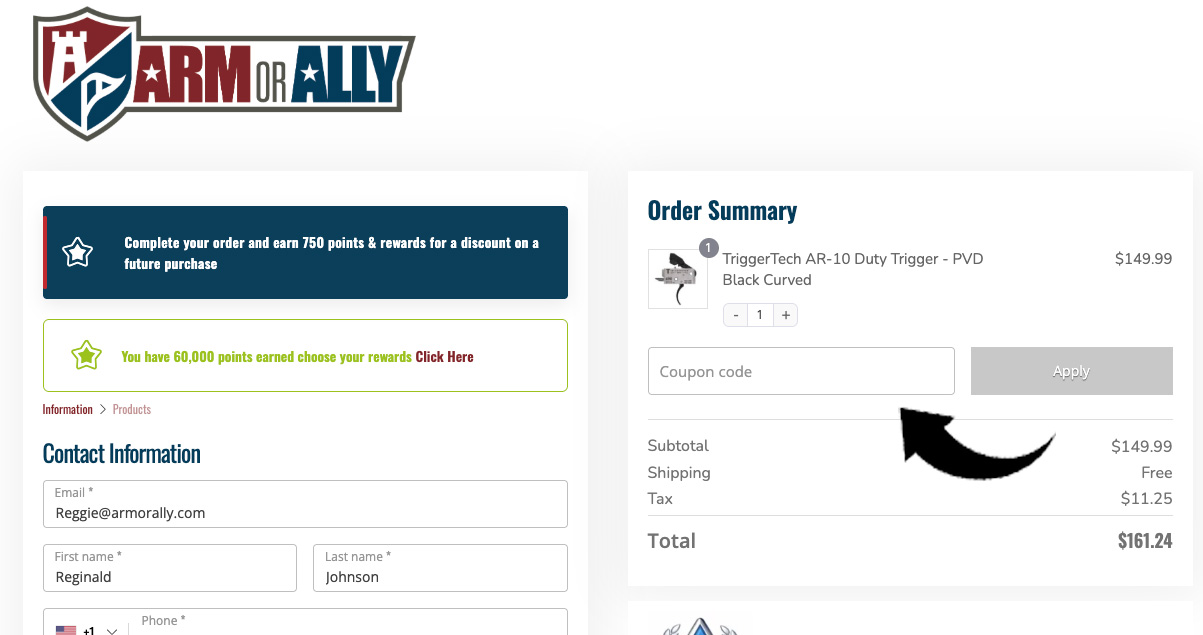
Discount codes can be applied during checkout before your order is submitted. If you have a valid coupon, promotion, or rewards discount code, enter it in the coupon code field located within the Order Summary section of checkout.
Applying a discount code
- Add your desired products to your cart and proceed to checkout.
- Locate the Coupon Code field in the Order Summary section.
- Enter your discount code exactly as it was provided.
- Click the Apply button.
- Verify that the discount has been applied before completing your order.
Common reasons a discount code may not work
- The code has expired.
- The code is case-sensitive and was entered incorrectly.
- The promotion applies only to specific products or categories.
- The minimum purchase requirement has not been met.
- The code has already been used or reached its usage limit.
- Another promotion or discount is already applied and cannot be combined.
Using rewards discounts
If you participate in our rewards program, eligible rewards can be redeemed for discount codes. Once generated, these codes are applied using the same coupon code field during checkout.
If you believe your discount code should be working but continues to be rejected, please open a support ticket and include the code you are attempting to use along with any error message displayed during checkout.