Arm Or Ally customer accounts are created during checkout. Creating an account allows you to participate in our rewards program, access referral rewards, track orders, view order history, and manage your account information.
How to create an account
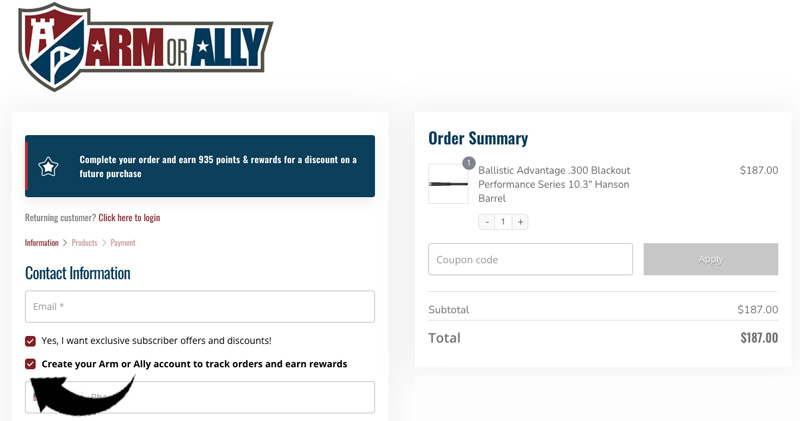
When placing an order, you will be given the option to create an account and establish a password during checkout. To ensure your purchases are associated with your account and rewards profile, we recommend creating your account before completing your order.
Important information
Accounts can only be created during the checkout process. If you complete your purchase as a guest, an account will not be created automatically and rewards points cannot be associated with that order through a customer account.
If you plan to participate in the Arm Or Ally Rewards Program or use Refer a Friend benefits, be sure to create your account during checkout.
Accessing your account
You can access your account at any time by visiting the My Account page.
Forgot your password?
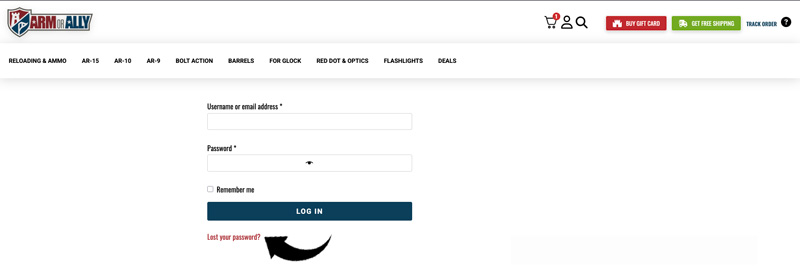
If you already have an account and cannot remember your password, you can use the Lost Password feature available on the My Account page. Password resets can be completed without contacting customer support. Make sure and use the same email address you used at checkout when resetting your password.
Benefits of having an account
- View current and previous orders.
- Track shipments and access tracking information.
- Participate in the Arm Or Ally Rewards Program.
- Access Refer a Friend rewards.
- Manage billing and shipping information.
- View your rewards points and redemption history.
If you are experiencing issues accessing an existing account after attempting a password reset, please open a support ticket and our team will be happy to assist you.